

Designing artwork on a computer screen and printing it on physical materials can produce different color results. A bright blue, vibrant green, or saturated red that looks perfect on a monitor may appear duller or change slightly when printed. This difference occurs because digital screens and printing machines use different color systems.
RGB (Red, Green, and Blue) is primarily used for displaying digital content, while CMYK (Cyan, Magenta, Yellow, and Key/Black) is widely used in ink-based printing. Converting RGB to CMYK helps designers prepare artwork for printing and evaluate how colors may reproduce in the final output.
Whether designing product labels, packaging, brochures, business cards, or marketing materials, understanding RGB to CMYK conversion is essential for improving color consistency and reducing unexpected printing results. For businesses looking for professionally printed labels and packaging solutions, Primotex Labels Pvt Ltd offers custom label manufacturing expertise to help brands prepare high-quality printed materials that align with their design and packaging requirements.
What Is RGB Color Mode?
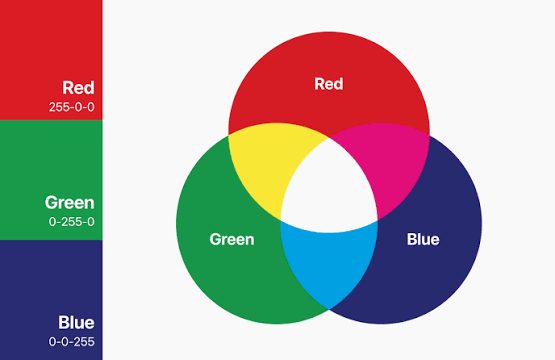
RGB stands for Red, Green, and Blue. It is an additive color model that creates colors by combining light from these three primary channels.
Digital devices such as computer monitors, smartphones, televisions, and tablets commonly use RGB to display images and graphics. Each channel is typically represented by values ranging from 0 to 255 in an 8-bit RGB image.
For example:
- RGB (255, 0, 0) represents red.
- RGB (0, 255, 0) represents green.
- RGB (0, 0, 255) represents blue.
- RGB (0, 0, 0) represents black.
- RGB (255, 255, 255) represents white.
When red, green, and blue light are combined at full intensity, they produce white. When no light is emitted, the result is black.
Where Is RGB Used?
RGB is suitable for designs intended for digital displays, including:
- Websites and landing pages
- Social media graphics
- Mobile applications
- Digital advertisements
- Online banners
- Screen-based presentations
- Digital photography
RGB can represent colors that cannot be reproduced using many conventional CMYK printing processes. Therefore, artwork created in RGB may require color conversion before it is sent for production.
What Is CMYK Color Mode?
CMYK stands for Cyan, Magenta, Yellow, and Key (Black). It is a subtractive color model used in many printing workflows.
Unlike RGB, which generates colors through light, CMYK creates colors by applying inks or printing colorants to a substrate. The inks absorb some wavelengths of light, while the remaining reflected light contributes to the color perceived by the viewer.
The four components are:
| Color | Printing function |
|---|---|
| Cyan (C) | Contributes blue-green tones |
| Magenta (M) | Contributes red-purple tones |
| Yellow (Y) | Contributes yellow tones |
| Black (K) | Adds depth, detail, and dark tones |
In practical printing, the exact result depends on ink characteristics, the printing process, substrate, color profile, and production settings.
CMYK is commonly used in commercial printing, including packaging, brochures, business stationery, and many types of product labels.
Why Is Black Called K in CMYK?
The letter K refers to the key plate, traditionally associated with black in printing. Using a separate black ink helps produce strong dark details, improve text reproduction, and reduce the amount of colored ink needed to create dark areas.
RGB vs CMYK: Key Differences
Understanding the difference between RGB and CMYK helps designers choose the right color workflow for their projects.
| Feature | RGB | CMYK |
|---|---|---|
| Full form | Red, Green, Blue | Cyan, Magenta, Yellow, Key |
| Color system | Additive | Subtractive |
| Primary application | Digital screens | Ink-based printing |
| Color creation | Combination of light | Combination of inks or colorants |
| Color gamut | Depends on RGB color space and device | Depends on CMYK profile, inks, and substrate |
| Common file preparation | Digital display artwork | Print production artwork |
| Main consideration | Screen appearance | Printed color reproduction |
RGB is not universally better than CMYK, and CMYK is not identical across every printing machine. The appropriate color mode depends on the intended output and the specifications of the printing workflow.
Why Convert RGB to CMYK Before Printing?
RGB to CMYK conversion is useful when digital artwork is being prepared for a printing process that uses a CMYK-based workflow.
1. Identify Colors Outside the Printing Gamut
Some RGB colors are outside the range that a particular CMYK profile can reproduce. During conversion, these colors may be mapped to alternative printable values.
This can result in changes to saturation, brightness, or hue.
2. Preview Potential Color Changes
Converting artwork and using an appropriate color profile can help designers identify colors that may require adjustment before production.
However, a CMYK conversion preview is not a guarantee of the exact final print result.
3. Prepare Artwork for the Printing Workflow
Printing suppliers may specify particular color profiles, PDF settings, ink limitations, or other prepress requirements. Preparing artwork according to those requirements helps reduce avoidable production issues.
4. Improve Brand Color Consistency
For product labels and packaging, maintaining recognizable brand colors is important. Color management, proofing, and consistent production conditions can help improve repeatability across print runs.
How to Convert RGB to CMYK: Step-by-Step Process
The conversion process depends on the software, color profile, and intended printing method. The following workflow provides a general approach.
Step 1: Identify the Intended Printing Process
Before converting the artwork, confirm how it will be printed.
Consider:
- Digital printing or offset printing
- Flexographic or other label printing processes
- Substrate or label material
- Required CMYK color profile
- Whether spot colors are needed
- Supplier-specific artwork requirements
A printing supplier may recommend a particular profile or file format. When available, use those specifications instead of selecting a generic setting without checking.
Step 2: Open the Artwork in Design Software
Open the original artwork in a suitable application such as Adobe Photoshop, Adobe Illustrator, or another color-managed design tool.
Keep an editable copy of the original RGB file before making significant changes.
Step 3: Convert to an Appropriate CMYK Profile
Use the software’s color management or color mode settings to convert the document.
The correct profile depends on the printing conditions. A generic CMYK conversion may be useful for basic preparation, but it does not automatically represent every printer, ink set, or substrate.
Step 4: Review the Converted Colors
Inspect the artwork after conversion. Pay particular attention to:
- Bright and saturated colors
- Skin tones
- Corporate brand colors
- Gradients
- Dark backgrounds
- Fine text and small design elements
Adjust colors where necessary while maintaining the intended visual appearance.
Step 5: Use Soft Proofing When Supported
Soft proofing simulates how colors may appear under a selected output profile. It can help identify potential gamut limitations and color changes before physical printing.
The result depends on the selected profile, monitor calibration, viewing conditions, and software settings.
Step 6: Export the Print-Ready File
Export the artwork using the printing supplier’s requirements. Depending on the workflow, this may involve a suitable PDF standard, embedded or specified color profiles, bleed, and other prepress settings.
Always verify the final file rather than assuming that an exported PDF is automatically print-ready.
How to Convert RGB to CMYK in Adobe Photoshop
Adobe Photoshop provides color mode and color management features for preparing raster artwork.
Conversion Steps
- Open the image in Adobe Photoshop.
- Save an editable backup of the original file.
- Open the Image menu.
- Select Mode and choose the required CMYK option, or use the appropriate color conversion workflow.
- Review the converted image.
- Check colors that have changed significantly.
- Apply adjustments where required.
- Save or export the file according to the printing requirements.
Important Photoshop Consideration
Changing the color mode can alter the available color range and affect editing capabilities. It is useful to retain the original RGB version so that future digital or alternative print outputs can be prepared independently.
For more controlled conversion, use the intended CMYK profile through the application’s color management options.
How to Convert RGB to CMYK in Adobe Illustrator
Adobe Illustrator is commonly used for vector artwork, including logos, icons, packaging layouts, and label designs.
Conversion Steps
- Open the Illustrator artwork.
- Save an editable copy.
- Check the document’s color settings.
- Change the document or artwork colors to the appropriate CMYK workflow.
- Review fills, strokes, gradients, and transparency.
- Inspect important brand colors and fine details.
- Export the file using the printing supplier’s requirements.
Why Illustrator Is Useful for Print Artwork
Vector artwork can be scaled without the same pixel-based limitations as raster images. However, vector artwork still requires appropriate color management, typography handling, and output preparation.
Converting the color mode does not automatically ensure correct bleed, overprint, trapping, or other production settings.
Can You Convert RGB to CMYK in Canva?
Canva is widely used for creating digital designs, but its available color and export options depend on the account, design type, and current platform features.
Before using Canva for commercial printing, check whether the required CMYK export option is available in the current workflow. If the design must meet specific prepress requirements, the exported file may need additional checking or processing in professional design or prepress software.
Recommended Canva Workflow
- Create the design using the required dimensions.
- Use brand colors carefully.
- Check the available download and color settings.
- Export in the format supported by the printing supplier.
- Verify the resulting file’s color mode, dimensions, and print requirements.
- Request a proof or confirm the file with the printing provider when necessary.
Do not assume that every Canva export is suitable for every printing process.
What Is a CMYK Color Profile?
A CMYK color profile describes how color values are interpreted for a particular printing condition. It helps color-managed applications translate colors between different devices and output conditions.
Different profiles can produce different color results from the same numerical CMYK values.
For example, the appearance of a color can vary depending on:
- Ink characteristics
- Paper or label substrate
- Printing process
- Total ink coverage
- Viewing conditions
- Color management settings
Why Does the Profile Matter?
Selecting a profile that matches the intended printing condition can improve the usefulness of on-screen previews and help maintain a more consistent workflow.
The correct profile should be confirmed with the printing supplier, especially for commercial packaging and label production.
Why Do RGB Colors Look Different After CMYK Conversion?
One of the most common challenges in RGB to CMYK conversion is color shift. A color shift occurs when a color changes in appearance during conversion or printing.
1. RGB Has Colors Outside the CMYK Gamut
Certain bright RGB colors cannot be reproduced exactly by a particular CMYK printing condition. Conversion must map them into the available output range.
2. Screen Brightness Affects Perception
Screens emit light, which can make colors appear more luminous and vibrant. Printed materials reflect ambient light and therefore have a different visual appearance.
3. Printing Substrates Affect Color
White coated paper, uncoated paper, transparent films, and other label materials can affect how inks appear.
4. Different Printing Technologies Produce Different Results
Digital, offset, and flexographic printing workflows can use different inks, substrates, and production conditions. As a result, the same artwork may not look identical across processes.
How to Reduce Color Shift
- Use an appropriate output color profile.
- Review colors before printing.
- Avoid relying only on a screen preview.
- Request a physical proof when color accuracy is important.
- Confirm production specifications with the printing supplier.
RGB to CMYK for Label and Packaging Printing
Color conversion is especially important in product label and packaging design because printed colors contribute to brand recognition and product presentation.
A logo, product name, or packaging design may need to maintain a consistent visual identity across multiple production runs.
1. Confirm Brand Color Requirements
Brand guidelines may specify CMYK values, spot colors, Pantone references, or other color standards. Follow the brand’s approved specifications and confirm how those colors should be reproduced in the selected printing process.
2. Consider Label Material
The same ink combination can appear different on different materials. For example, a design printed on a coated label stock may appear different from one printed on an uncoated or transparent substrate.
3. Use Proofing for Important Designs
A physical proof or an appropriate supplier-approved proofing process can help evaluate color appearance before a larger production run.
4. Check Small Text and Fine Details
Label artwork often contains barcodes, product information, regulatory text, and other details. Color selection, contrast, resolution, and production settings should be checked to support readability and print quality.
5. Discuss Color Expectations With the Manufacturer
Designers should provide clear artwork specifications and communicate which colors are critical. A printing manufacturer can help identify suitable production options and explain limitations before the job is finalized.
For businesses requiring custom product labels, Primotex Labels Pvt Ltd can be considered as a potential printing and label manufacturing partner. Final production specifications should be confirmed directly with the manufacturer.
Common RGB to CMYK Conversion Mistakes
Mistake 1: Assuming CMYK Guarantees Exact Colors
Converting a file to CMYK does not guarantee that the final print will exactly match the screen. Output conditions and physical materials influence the result.
Mistake 2: Using the Wrong Color Profile
A profile that does not match the intended printing condition can lead to less predictable color reproduction.
Mistake 3: Skipping Proofing for Critical Brand Colors
When color consistency is commercially important, relying only on an on-screen preview can increase the risk of unexpected results.
Mistake 4: Overlooking the Printing Material
Paper, films, coatings, and other substrates can influence the appearance of printed colors.
Mistake 5: Exporting Without Checking the Final File
A file can have the expected color mode but still fail other production requirements, such as bleed, resolution, dimensions, or PDF settings.
Tips for Accurate RGB to CMYK Conversion
Follow these practices when preparing artwork for printing:
- Identify the intended printing method before preparing the final artwork.
- Confirm the required color profile with the printing supplier.
- Keep an editable copy of the original design.
- Review important colors after conversion.
- Use soft proofing when appropriate.
- Request a physical proof for critical color requirements.
- Check bleed, resolution, and artwork dimensions.
- Confirm the final exported file against production specifications.
- Discuss spot colors and brand color matching when necessary.
- Use a consistent color management workflow for repeat print jobs.
RGB to CMYK Conversion: Frequently Asked Questions
1. What is RGB to CMYK conversion?
RGB to CMYK conversion is the process of translating artwork from an RGB color space into a CMYK color space or output condition for printing. The conversion can change the appearance of colors that are outside the target printing gamut.
2. Why should RGB be converted to CMYK for printing?
RGB and CMYK represent colors differently. Converting to an appropriate print-oriented color workflow helps designers evaluate color reproduction and prepare artwork according to printing requirements.
3. Can RGB colors be printed exactly in CMYK?
Not always. Some RGB colors fall outside the gamut of a particular CMYK printing condition. Additionally, the printing process, substrate, and viewing environment affect the final appearance.
4. Which is better for printing: RGB or CMYK?
Neither is universally better for every situation. RGB is primarily used for digital display, while CMYK is used in many ink-based printing workflows. The correct choice depends on the output process and supplier requirements.
5. How do you convert RGB to CMYK in Photoshop?
Open the image in Photoshop, use the appropriate color mode or profile conversion settings, review the result, and export the artwork according to the printing requirements. Retain the original RGB file for future use.
6. Why do colors become dull after RGB to CMYK conversion?
Some bright RGB colors cannot be reproduced within a particular CMYK gamut. The conversion process maps those colors to alternative values, which can reduce saturation or change their appearance.
7. Is CMYK suitable for label printing?
CMYK is used in many label printing workflows, but the suitability of a particular color setup depends on the printing technology, ink system, substrate, and production requirements. The manufacturer should confirm the appropriate specifications.
8. How can designers maintain brand colors during printing?
Use approved color specifications, suitable color profiles, proofing, and consistent production conditions. For critical brand colors, discuss the use of spot colors or other color-matching approaches with the printing supplier.
Conclusion
RGB to CMYK conversion is an important part of preparing digital artwork for physical printing. Understanding the difference between RGB and CMYK, selecting an appropriate color profile, reviewing color shifts, and following print-ready artwork requirements can help designers reduce avoidable color problems.
For label and packaging projects, color accuracy also depends on the printing technology, substrate, ink system, and proofing process. Converting a file alone is not enough to guarantee an identical result across different printing conditions.
By following a structured color management workflow and communicating production requirements with the printing manufacturer, businesses can make more informed decisions about their artwork and printed materials.more precise results.